WhatsApp Business Multiple Users: App vs Shared Inbox for Small Teams
Learn when WhatsApp Business linked devices are enough for a small team, and when a shared inbox is the better way to manage customer conversations.

Table of contents
- The short version
- How multiple users work in the WhatsApp Business app
- Current linked-device limits
- Where linked devices start to feel messy
- What a shared inbox changes
- One conversation, one clear owner
- Internal notes stay out of the customer chat
- Handoffs become less awkward
- WhatsApp Business app vs shared inbox
- A useful test: are you sharing access or sharing responsibility?
- When the WhatsApp Business app is probably enough
- When a shared inbox starts earning its keep
- 1. Staff ask, "Who is answering this?"
- 2. Customers occasionally get two replies
- 3. Messages are being opened but not resolved
- 4. You need context that customers should not see
- 5. Routine questions consume a large part of the day
- 6. A reply depends on another system
- What about WhatsApp's own multi-agent features?
- Do you need the WhatsApp Business Platform?
- A simple example: a three-person rental business
- How LoloDesk approaches this
- How to decide in five minutes
- Frequently asked questions
- Can multiple people use one WhatsApp Business account?
- Can employees use WhatsApp Business without sharing the main phone?
- Is a shared inbox the same as WhatsApp Business?
- Do two employees need a shared inbox?
- Does WhatsApp Business support chat assignment?
- What is the main advantage of a shared inbox?
- Can a shared inbox also handle website chat?
- The bottom line
- Sources and further reading
One WhatsApp Business number is often enough when a business is small. The owner answers a few questions, someone else helps during busy hours, and everyone knows what is going on.
Then the business gets busier.
A customer asks for availability while another asks about pricing. Someone replies from the shop laptop. Someone else replies from a phone. A third person assumes the first customer has already been handled.
This is usually the point where the problem stops being "Can more than one person use our WhatsApp number?" and becomes "How do we stop stepping on each other's work?"
The short answer is that WhatsApp Business does support multiple devices. For many very small teams, that is enough. A shared inbox becomes more useful when the team needs clear ownership, internal context, automation, reporting, or a reliable handoff between people.
This guide explains the difference without assuming that every small business needs more software.

The short version
If you only need two or three people to occasionally answer the same WhatsApp Business account, start with WhatsApp's own linked-device setup.
As of September 2026, WhatsApp says the Business app can be used on up to four linked devices at once in addition to the primary phone. The primary phone does not have to remain online, although it still needs to be used periodically to keep linked devices connected.
WhatsApp also offers expanded multi-agent features through some Meta Verified or Meta One business plans. Depending on the plan and availability, businesses may be able to connect more devices and assign chats to agents.
That means a small business should not buy a shared inbox simply because a second employee needs access.
A shared inbox starts to make sense when your problem is no longer device access. It is coordination.
| If your team mainly needs... | Start with |
|---|---|
| A few people seeing and replying to the same WhatsApp account | WhatsApp Business linked devices |
| More linked devices and basic agent assignment, where available | Meta's eligible business subscription options |
| Clear conversation ownership across a team | Shared inbox |
| Internal notes and handoff context | Shared inbox |
| WhatsApp and website chat in one workspace | Shared inbox |
| AI handling repeat questions | Shared inbox with automation |
| Booking, availability, order, or CRM actions from conversations | Shared inbox with business integrations |
| Response-time, handoff, or team reporting | Shared inbox |
The important distinction is simple:
Linked devices help more people open WhatsApp. A shared inbox helps a team operate customer conversations as work.
How multiple users work in the WhatsApp Business app
The standard WhatsApp Business app is more capable than it used to be.
You keep one primary business account and link additional devices such as computers, tablets, or companion phones. Team members can then read and respond to conversations from those devices.
For a small shop, family business, freelancer with an assistant, or a front desk with light message volume, this can work perfectly well.
For example, imagine a scooter rental business where the owner normally answers WhatsApp, but a receptionist helps when the owner is out delivering a bike.
They may not need assignments, queues, reporting, or automation. They just need the receptionist to see the conversation and answer.
In that situation, adding a shared inbox may solve a problem the business does not actually have.
Current linked-device limits
According to WhatsApp's Help Center, the WhatsApp Business app supports up to four linked devices at one time without requiring the primary phone to stay connected.
WhatsApp also states that eligible businesses using certain Meta Verified or Meta One plans can receive higher device limits and multi-agent features. Availability and benefits can vary by plan and location, so it is worth checking the options shown inside your own WhatsApp Business account rather than assuming every account has the same limits.
Because these limits can change, check the official WhatsApp Business linked-device documentation before making a long-term decision based only on device count.
Where linked devices start to feel messy
The limitation is not necessarily how many screens can open the inbox.
The harder part is knowing what everyone is doing.
Picture a small hotel receiving this conversation:
Hi, do you have a family room available from Friday to Sunday? We are two adults and two kids.
One receptionist opens the message and checks availability.
Before that person replies, another staff member sees the same conversation and starts checking too.
The first receptionist sends:
Yes, we have one family room available.
Thirty seconds later, the second receptionist sends:
Sorry, we're fully booked for Saturday.
The problem is not WhatsApp. Both staff members had access.
The problem is that there was no clear owner for the conversation.
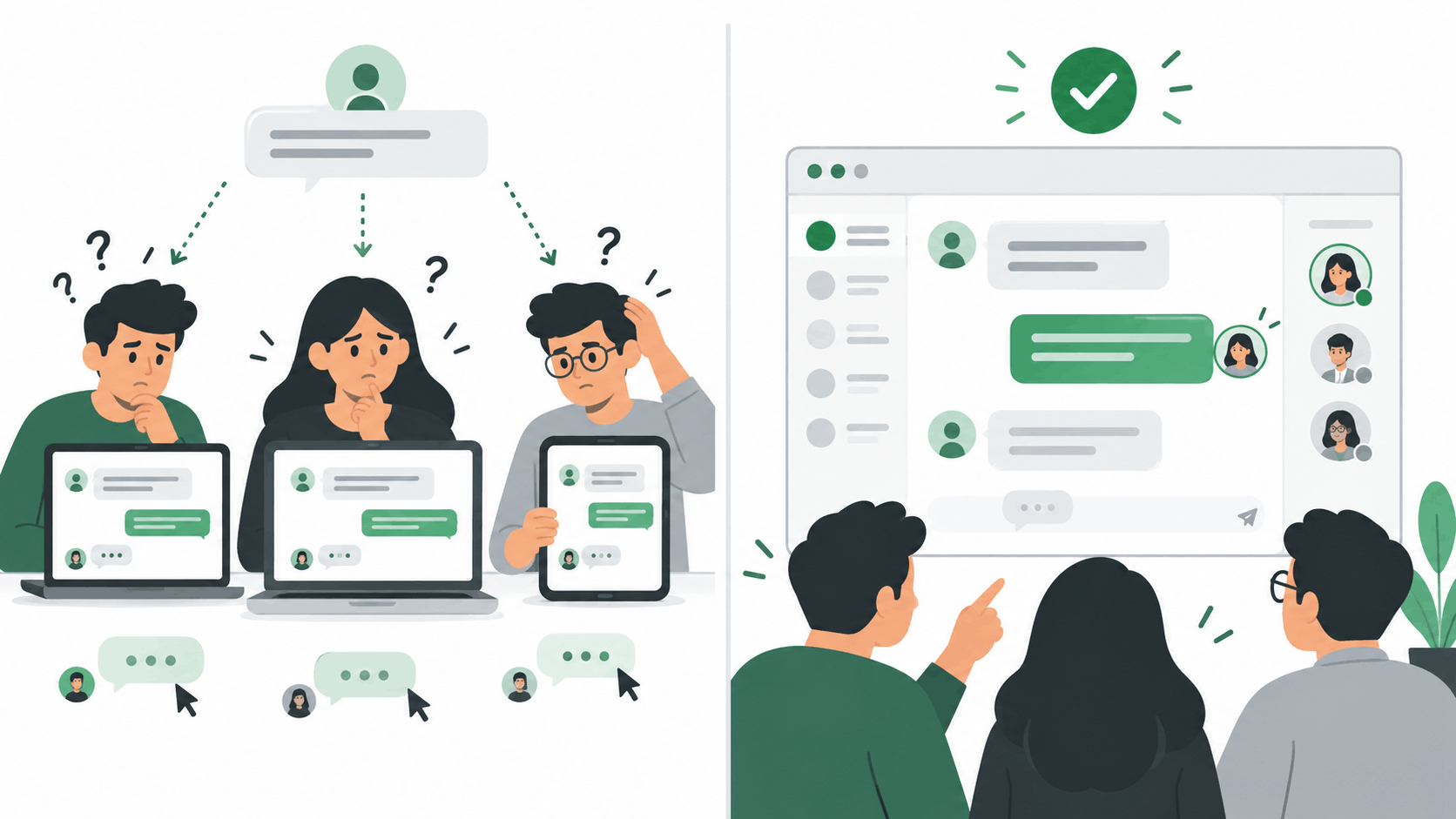
As volume increases, small coordination problems start appearing:
- two people reply to the same customer;
- everyone assumes someone else will reply;
- a conversation is opened and forgotten;
- a customer has to repeat information after a shift change;
- staff discuss the customer in a separate group chat;
- nobody knows which inquiries are still waiting;
- a manager cannot easily see why response times are getting slower.
You can solve some of this with discipline.
A two-person team might simply agree: Anna answers mornings, Ben answers afternoons.
That is still a valid system.
But once the process requires a separate spreadsheet, staff group chat, sticky notes, or constant "Did you answer this one?" messages, the business has effectively started building a support system outside WhatsApp.
What a shared inbox changes
A shared inbox is a workspace built for several people to manage customer conversations together.
The customer still messages the business. From the customer's point of view, little needs to change.
The difference is on the team's side.
Instead of treating a message as something everyone can see, the team can treat the conversation as a piece of work with an owner, status, history, and handoff.
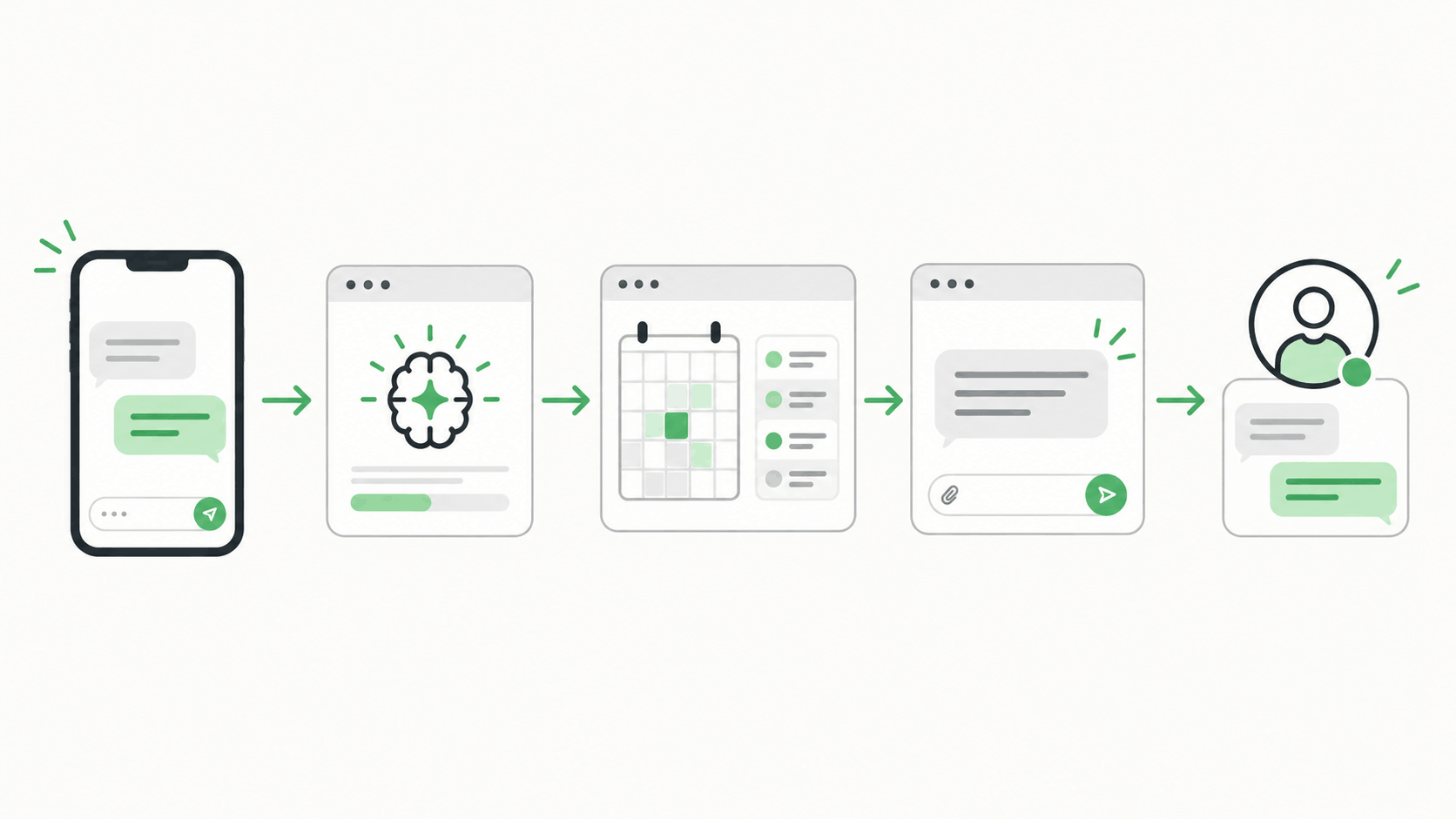
A typical flow might look like this:
Customer sends a WhatsApp message
        ↓
Conversation enters the shared inbox
        ↓
AI or a teammate handles a routine question
        ↓
Conversation is assigned to the right person
        ↓
Internal context stays with the conversation
        ↓
Another teammate can take over when needed
That structure matters more than simply giving everyone another login.
One conversation, one clear owner
A shared inbox can make it obvious who is handling a customer.
That does not mean only one person can ever touch the conversation. It means the team does not have to guess.
If Maria is working on a booking request, the rest of the team can see that Maria owns it. If her shift ends, she can hand it to John with the context attached.
This becomes especially useful when sales, bookings, reception, and support all share the same business number.
Internal notes stay out of the customer chat
Some context should be visible to the team but not sent to the customer.
For example:
Guest asked for early check-in. Room is still being cleaned. Confirm with housekeeping before promising 12 PM.
Without a shared inbox, that note may live in Messenger, Slack, a staff WhatsApp group, or someone's memory.
With an inbox that supports private notes, the context can stay beside the customer conversation.
Handoffs become less awkward
Small businesses often think of handoffs as something only large support teams need.
In practice, handoffs happen constantly.
A receptionist sends a payment issue to the owner.
A sales assistant sends a technical question to someone who knows the product.
An AI assistant answers opening-hours questions but gives a refund request to a person.
A weekend employee leaves an unresolved booking inquiry for the Monday team.
A good handoff preserves what the customer already said. The customer should not have to start again just because someone else took over.
WhatsApp Business app vs shared inbox
Here is a more practical comparison.
| Need | WhatsApp Business app | Shared inbox |
|---|---|---|
| Use one business number on several devices | Yes, within current linked-device limits | Yes, depending on the provider and WhatsApp setup |
| Let a few staff reply to customers | Yes | Yes |
| Native agent assignment | Available with some eligible Meta business plans | Common shared-inbox feature |
| Clear conversation ownership | Basic to moderate, depending on Meta plan | Usually a core feature |
| Private internal notes | Limited compared with dedicated team inboxes | Common feature |
| Team handoff workflow | Can be handled manually | Usually built in |
| Combine WhatsApp with website chat | No | Possible with an omnichannel inbox |
| AI answers from business knowledge | Limited/native options vary | Often available depending on provider |
| Trigger booking, availability, order, or other business actions | Not the main purpose of the app | Possible when the inbox supports integrations |
| Team and conversation analytics | Limited | Often available |
| Best fit | Very small teams with simple coordination | Teams where customer conversations have become an operational workflow |
This is why "How many people are on your team?" is not the best deciding question.
A team of six with low message volume and clear shifts may be fine with a simple setup.
A team of three handling 100 booking questions a day may need structure much earlier.
A useful test: are you sharing access or sharing responsibility?
Ask yourself what you are actually trying to fix.
If the problem is:
"My assistant needs to answer messages when I'm driving."
Linked devices may be enough.
If the problem is:
"Three of us answer WhatsApp and we keep losing track of who is handling which customer."
You have a workflow problem.
If the problem is:
"We answer the same availability, pricing, pickup, and policy questions all day."
You may have an automation problem.
And if the problem is:
"Customers ask on WhatsApp, our website, and other channels, and we cannot see the full history in one place."
You have a conversation-management problem.
Those are different problems, even though they all start with "we need multiple users on WhatsApp."
When the WhatsApp Business app is probably enough
Keep the simpler setup if most of these are true:
- only a few people answer messages;
- customer volume is manageable;
- staff work clearly separated shifts;
- duplicate replies rarely happen;
- people know who owns each inquiry;
- customers are not regularly being forgotten;
- you do not need private notes beside conversations;
- you do not need WhatsApp and website chat in one place;
- you are comfortable handling bookings, orders, or availability in separate tools;
- reporting is not important yet.
There is no prize for adopting a bigger support stack early.
The smallest system that reliably serves customers is usually the right one.
When a shared inbox starts earning its keep
Consider moving to a shared inbox when two or three of these are happening regularly:
1. Staff ask, "Who is answering this?"
This is the clearest sign.
The team has access, but ownership is unclear.
2. Customers occasionally get two replies
Duplicate replies make a small business look disorganized, even when both employees were trying to help.
3. Messages are being opened but not resolved
"Read" and "handled" are not the same thing.
Once a team gets busy, someone needs a reliable way to see which conversations are still waiting.
4. You need context that customers should not see
Private notes, handoff details, or staff-only instructions become important as soon as more than one person handles the same customer.
5. Routine questions consume a large part of the day
If staff repeatedly type the same answers about hours, pricing, availability, requirements, pickup instructions, policies, or locations, access is no longer the only issue.
Automation may be able to remove some of that repetitive work.
6. A reply depends on another system
This is common in service businesses.
A customer asks:
Do you have two scooters available tomorrow from 9 AM to 5 PM?
The useful response depends on live availability.
Or:
Can you check my booking?
That requires a booking lookup.
At that point, the ideal workflow is not simply "give another employee WhatsApp access." It is to connect the conversation to the business process required to answer it.
What about WhatsApp's own multi-agent features?
This deserves a clear answer because older articles often oversimplify the topic.
WhatsApp's business offering continues to evolve.
The free WhatsApp Business app supports linked devices, and Meta now offers expanded business subscription features in some markets. WhatsApp's own documentation says eligible plans can support additional devices and agent assignment.
For some businesses, that closes much of the gap.
If all you need is:
- several staff devices;
- basic chat assignment;
- the familiar WhatsApp interface; and
- no deeper customer-support workflow,
then Meta's own tools may be the simpler choice.
A third-party shared inbox becomes more compelling when you need capabilities around WhatsApp rather than merely inside it: internal collaboration, multiple customer channels, AI connected to your own business knowledge, workflow automation, analytics, or integrations with systems your team already uses.
That is a healthier way to evaluate the decision than assuming one option is always better.
Do you need the WhatsApp Business Platform?
You may hear the terms WhatsApp Business API, Cloud API, or WhatsApp Business Platform when researching shared inboxes.
The important thing to understand is that the WhatsApp Business Platform is the messaging infrastructure. A shared inbox is the workspace your team actually uses to manage those conversations.
They are related, but they are not the same thing.
For a small-business owner, the technical distinction matters less than a few practical questions:
- Can we keep using the business number our customers already know?
- Can several teammates work without sharing personal passwords?
- Can we clearly see who owns each conversation?
- What happens to our existing setup when we connect?
- Are there WhatsApp or provider messaging charges?
- Can we still use the WhatsApp Business app if we need it?
- How are customer data and permissions handled?
- Can we leave or migrate later without losing control of our number?
Ask those questions before choosing a provider.
Do not choose a shared inbox because its homepage has the longest feature list.
Choose it because the workflow matches the way your team actually serves customers.
A simple example: a three-person rental business
Imagine a scooter rental business with three people:
- Mia handles the front desk;
- Carlo handles deliveries;
- the owner steps in for problems and special requests.
Most customers arrive through WhatsApp.
A typical message is:
Hi, do you have two scooters available from September 18 to 21? We are staying in General Luna.
With linked devices, all three people can potentially see the message.
That solves access.
But the business still has to decide:
- Who should answer?
- Has anyone checked the dates?
- Which scooter models are available?
- Has the guest given enough information?
- Does someone need to approve a special request?
- Who follows up if the customer disappears?
- What happens when Mia's shift ends?
With a shared workflow, the inquiry might instead move like this:
Customer asks for two scooters
        ↓
Dates, quantity, and location are captured
        ↓
Availability is checked
        ↓
Routine information is answered
        ↓
Mia owns the conversation
        ↓
Special request appears
        ↓
Owner takes over with the full context
The value is not that three people can type into WhatsApp.
They could already do that.
The value is that everyone knows what happens next.
How LoloDesk approaches this
LoloDesk's WhatsApp inbox is designed around that small-team coordination problem.
Instead of treating WhatsApp as an isolated message feed, LoloDesk puts customer conversations into a shared workspace where the team can keep context, hand work to the right person, and bring a human in when a conversation needs judgment.
For repetitive questions, the AI assistant can handle approved business information. For workflows that depend on live data, Business Actions can connect a conversation to tasks such as checking availability or looking up booking information.
The goal is not to automate every conversation.
It is to automate the predictable parts and make the human parts easier to manage.
If all you need today is another device, use another device.
If what you need is a better process, that is when a shared inbox becomes worth looking at.
How to decide in five minutes
Use these questions with your team:
- How many people regularly answer the same WhatsApp number?
- Do duplicate or missed replies happen at least a few times per month?
- Can everyone tell who currently owns an inquiry?
- Do handoffs require a separate staff chat or verbal explanation?
- How much time do we spend answering the same questions?
- Do replies depend on booking, inventory, availability, order, or CRM data?
- Do customers also contact us through our website?
- Would knowing response times or unresolved conversations help us manage the business?
If your answers are mostly "no," keep the WhatsApp Business app.
If several are "yes," test a shared inbox using your real workflow rather than a made-up demo.
Take ten or twenty recent customer conversations and ask: Would this setup have made those conversations easier to manage?
That will tell you more than a feature checklist.
Frequently asked questions
Can multiple people use one WhatsApp Business account?
Yes. WhatsApp Business supports linked devices, so several devices can access the same business account. WhatsApp currently documents support for up to four linked devices with the standard setup. Some eligible Meta business subscription plans allow additional devices and multi-agent features.
Can employees use WhatsApp Business without sharing the main phone?
Yes. Linked devices can continue working without the primary phone remaining online. WhatsApp does require periodic use of the primary phone to keep linked devices connected.
Is a shared inbox the same as WhatsApp Business?
No. WhatsApp Business is Meta's business messaging product. A shared inbox is a team workspace for managing conversations, often connected to WhatsApp through an official business integration.
Do two employees need a shared inbox?
Not necessarily.
If two people can coordinate easily and message volume is low, WhatsApp's linked-device setup may be all you need. A shared inbox becomes useful when ownership, handoffs, automation, internal context, or reporting become difficult to manage manually.
Does WhatsApp Business support chat assignment?
WhatsApp documents agent-assignment features for certain eligible Meta Verified or Meta One business subscriptions. Availability and limits can vary, so check the subscription options available to your business account.
What is the main advantage of a shared inbox?
For a small team, the biggest advantage is usually not "more users." It is knowing who is responsible for each customer conversation and preserving context when work moves between people.
Can a shared inbox also handle website chat?
Some platforms can. LoloDesk, for example, brings WhatsApp and website conversations into the same workspace so a team does not have to manage each channel separately.
The bottom line
WhatsApp Business linked devices are a good solution for many small businesses.
Use them for as long as the team can answer customers reliably without extra process.
Do not move to a shared inbox because an article tells you that three users is suddenly "too many."
Move when the cost of coordination becomes obvious: customers are missed, replies overlap, staff lose context, repetitive questions consume the day, or conversations need to trigger real business work.
At that point, the question is no longer whether multiple people can open WhatsApp.
It is whether your team has a reliable way to handle what happens after the message arrives.